A Menu Bar App Kills My Zombie Processes
My agents leave zombie processes behind that quietly eat my RAM. So I built myself a small macOS menu bar app that hunts them down and kills them off for me.
TL;DR
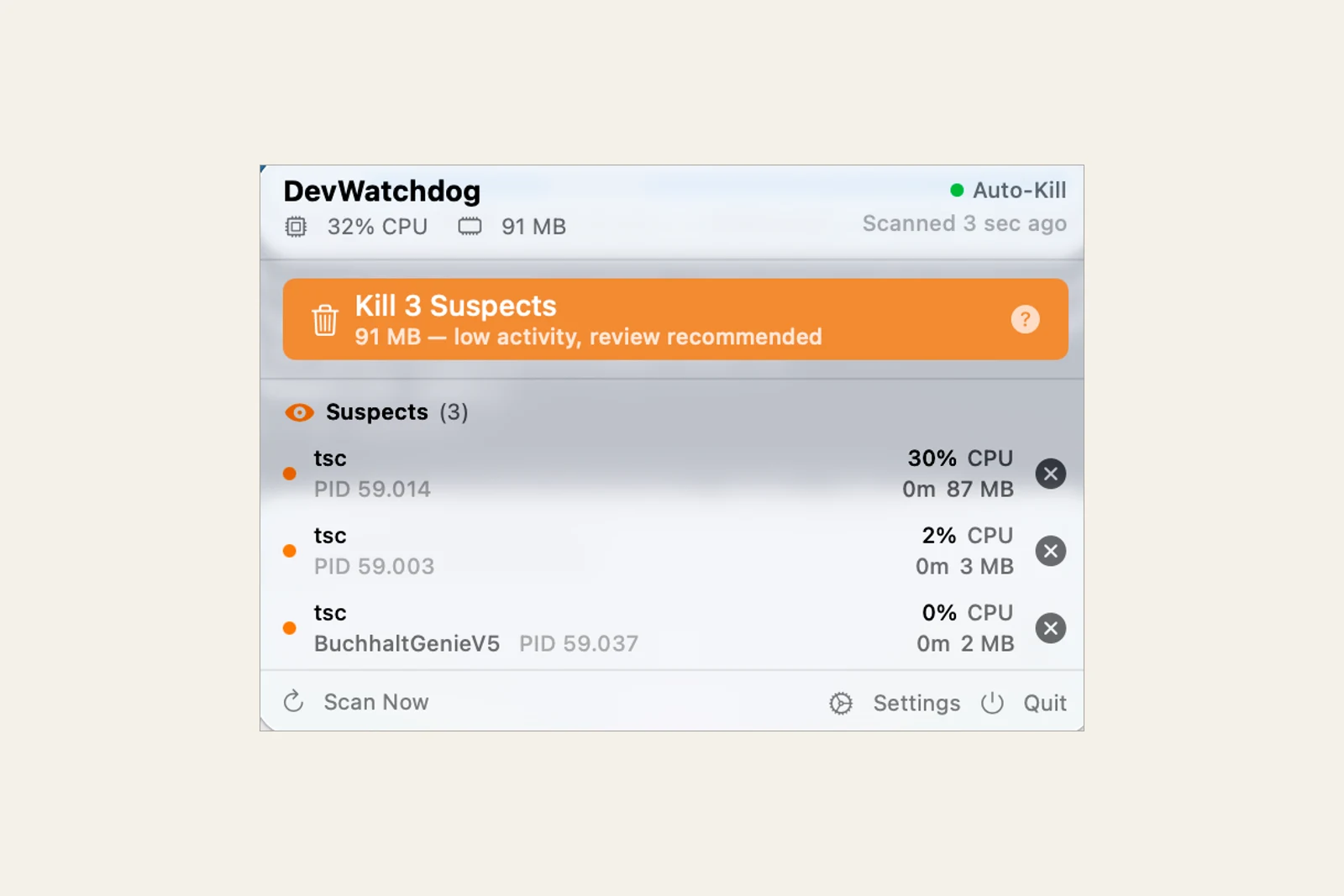
I often run a dozen parallel agent sessions on a MacBook with 24 GB of memory. Every session spins up test runs, typecheck builds, and MCP servers. When a session gets aborted, the child processes hang around: orphaned Vitest workers, stale Jest runners, forgotten tsc builds, idle MCP servers, and Playwright browsers that outlive their test runs. They attach to PID 1, keep running, and eat my RAM. So I built myself a small tool: DevWatchdog, a macOS menu bar app in Swift that scans every 30 seconds, gives a 30-second grace period, and then kills the orphans. This is a personal experiment, not a product. It now sits on the shelf.
The Problem: My Agents Leave Corpses Behind
Agentic building is a festival of processes. A single pnpm test spawns a whole canopy of fork workers. Add a typecheck run, a few MCP servers, a Playwright pass with real browsers. As long as the session stays alive and exits cleanly, the parent process reaps its children. The trouble starts when the session does not exit cleanly.
I abort sessions constantly. An agent heads in the wrong direction, I hit Ctrl-C, restart. The editor crashes. A test run hangs and I kill the terminal. In every one of those cases the parent process is gone, but its children are not. macOS re-parents the orphaned processes to PID 1, and there they keep running happily. A Vitest worker has no idea its master is dead. It waits for work that never comes and holds onto its memory the whole time.
On a big machine you barely notice. On 24 GB, with a dozen parallel sessions, you notice immediately. Memory pressure climbs, macOS starts to swap, and the one session I am actually working in turns sluggish. Why 24 GB in particular makes every corpse hurt for me, I described in more detail in The 24 GB Mac: Why My Local NVFP4 Setup Failed.
The DevWatchdog README shows dozens of orphaned workers at once as an example. That is illustrative UI copy, not a measurement, but it captures the feeling. Abort a session twenty times over the course of a day and the garbage piles up. My old reflex was a periodic pkill -f vitest in the terminal. Crude, risky, and I kept forgetting it. A small watchdog that does it for me was the obvious answer.
How It Works: Scan, Grace, Kill
The mechanism is deliberately plain. Three steps, no model, no cloud, no account:
- Scan every 30 seconds. A timer looks at the running development processes and matches them against a pattern: Vitest workers, Jest runners, tsc and tsgo builds, MCP servers, Playwright browsers. Every 30 seconds, not continuously, so the thing itself creates no noticeable load.
- A 30-second grace period. A process that first shows up as a candidate is not killed on the spot. It gets 30 seconds. That catches the most common false alarm: a process that is just starting and does not yet have a clean parent link. Anything that settles back to normal within the window survives.
- An orphan heuristic on PPID. The primary criterion is simple and robust: is the process an orphan? A process with parent PID 1 no longer has a living master. That is exactly the signature of a zombie from an aborted session. Instead of guessing at RAM thresholds, DevWatchdog kills what provably belongs to no one anymore.
That order is the whole point. Observe first, then wait, then act. An immediate kill based on RAM usage would hit precisely the runs that are productively holding memory right now. The orphan heuristic, by contrast, almost only hits what is truly dead.
Emergency Mode and Per-Process Limits
On top of the base mechanism sit two safety nets for when things do get tight:
- Emergency Mode. When the 5-minute load average crosses a threshold, the app switches into a sharper mode. The threshold is
emergencyLoadFactor × CPU count, by default 1.5× the cores. That is the moment the machine visibly starts to stagger, so the watchdog cracks down harder instead of waiting for the next gentle round. - Per-process-type limits. Not every process is equally suspect. A Vitest worker that has lived for 20 minutes is very likely forgotten. An MCP server, on the other hand, may run for hours, and that is normal. So each type gets its own ceiling: Vitest workers around 20 minutes, tsgo about 5, tsc about 8, MCP servers around 4 hours, and a catch-all of roughly 8 hours for everything else. Break your limit and you are gone.
The numbers are not science, they are gut feeling from my own use, cast into configuration. That is exactly the upside of a thing you build only for yourself: you get to tune the thresholds to your own behaviour instead of hunting for a compromise across other people's setups.
Agentic building produces side effects. Part of the work is cleaning up your own mess, ideally so that you never have to think about it.
The Stack: Swift, MenuBarExtra, and a Gatekeeper Warning
Why a native app and not a shell script? Because a menu bar app rides along unobtrusively. A small icon in the top right, one click shows what is running and what got killed. No terminal window I have to keep open and watch.
Technically it is deliberately thin: Swift 6.0, SwiftUI with MenuBarExtra for the menu bar icon, target macOS 15.0 and up, built with Xcode 16.2. Distributed as a DMG, signed with a Developer ID, but not notarized yet. That means Gatekeeper warns on first launch, and you have to approve the app once by hand. For a thing that only runs on my own machine, notarization was not worth the effort so far. It is a local macOS app, MIT-licensed, and it phones nowhere.
Why It Sits on the Shelf
DevWatchdog is a weekend experiment, not a product. It did its job on my machine and is now archived.
Three reasons it sits on the shelf:
- Killing processes is delicate. The orphan heuristic is good, but it is a heuristic. Wrongly killing a long-lived process is a real risk, not a theoretical one. A tool that kills automatically has to be genuinely trusted, and I have only built that trust for my own narrow use case.
- The missing notarization is a hurdle. The Gatekeeper warning is a non-issue for me, but for anyone else it would be the first point of friction. Solving that properly is work I would only invest if this were meant to become a product. It is not.
- The deeper fix belongs in process cleanup. Better process trees and consistent cleanup on session abort would prevent the orphans. DevWatchdog treats the symptom, which is enough for this personal tool.
The two evenings were still useful. The app saved me many manual pkill rounds and confirmed that a narrow personal tool can be a sufficient outcome.
Conclusion
What I take away from DevWatchdog is less the app than the attitude behind it:
- Agentic building cleans up its own mess too. Start many processes and you produce orphans. A small watchdog that scans, waits, and kills is the pragmatic answer to a self-inflicted problem.
- A good heuristic beats a RAM threshold. PPID 1 tells you reliably what is dead. Killing by memory usage would hit the wrong processes. The grace period catches the rest of the false alarms.
- Not every tool has to become a product. DevWatchdog remains an archived personal experiment.
If you run a similar number of sessions in parallel and your machine keeps tipping into swap, a small watchdog of your own might be worth it, or a disciplined pkill at the right moment. If you would rather have something like this built cleanly into your own way of working, the direct route is Contact. If you want a broader caretaker agent, one that doesn't just kill zombie processes but watches CI, dependencies, and error logs, and fixes small things itself with tests as a gate, that's what I walk through in The digital caretaker: your maintenance agent.